Built for makers, bakers, growers, and local vendors.
Standard Stripe or payment-app processing fees apply.
Why Order Local
It all started at your kitchen table...
Order Local can be the bridge to your real business. Spend more time making what you love; we give you a branded storefront, a secure payments platform, and organize your sales so that you can provide your products to your community while your business keeps growing.

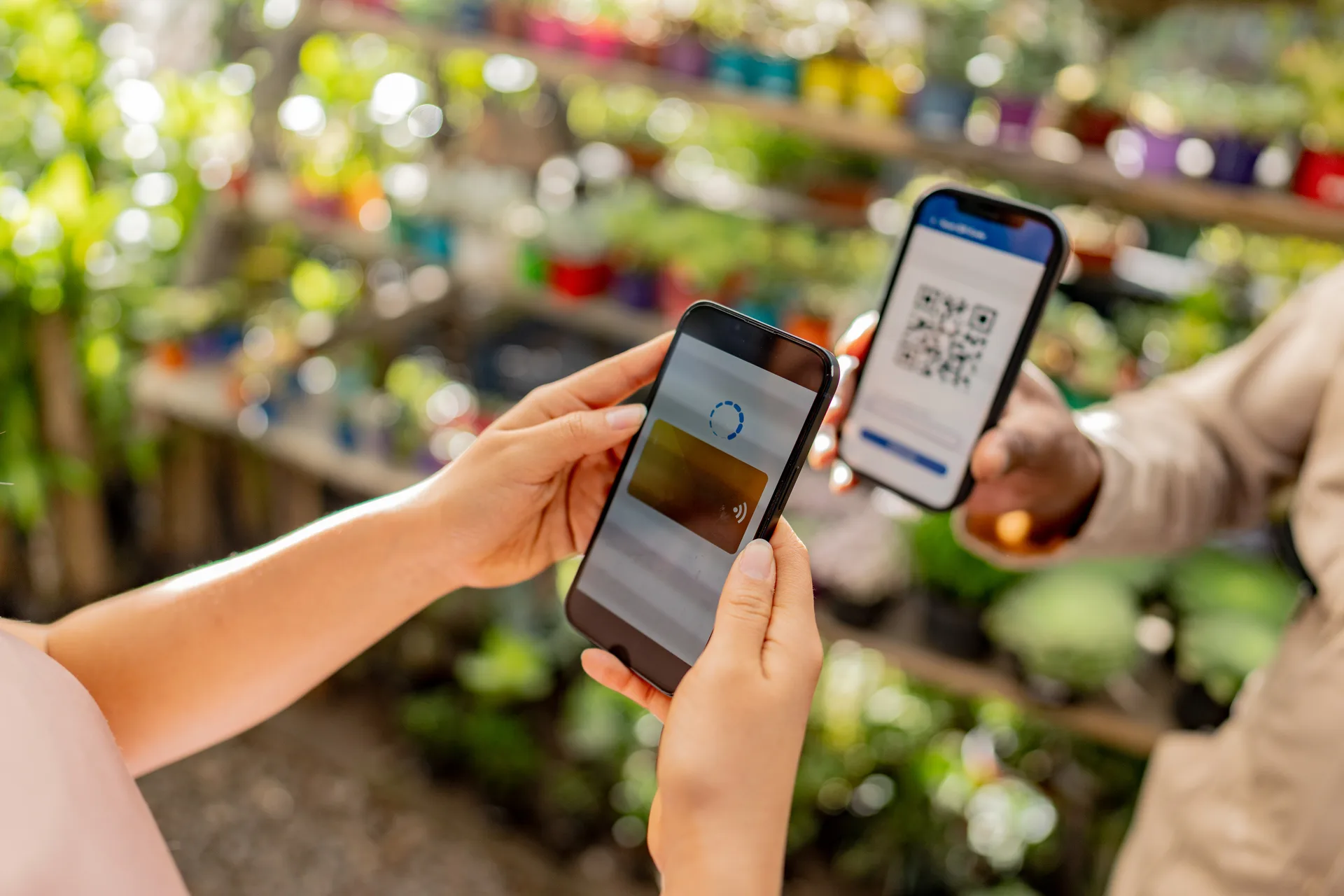
Order Local also comes with you to your market booth. Take walk-up sales on your phone quickly. You create their cart in Market Mode, show them a QR code, and customers pay on their own device — card, Apple Pay, or Google Pay (or Venmo, Cash App, or Zelle). No card reader, no hardware to buy, nothing to download.
Online and in person
Preorders for pickup and drop-off, walk-up sales at your booth.
Nothing to buy or install
No card reader, no apps. Your phone and your customers' phones are the whole setup.
Every dollar stays yours
No commission, ever. Free in months under $250 in sales.
"Order Local allows our customers to easily order from us online or directly. So, instead of spending a majority of our time answering messages and coordinating orders, we now spend more time making what we love."
Your storefront
Your own storefront — not just "DM me to order."
A real ordering page at your own web address, with your name, your colors, and your products. Customers browse, pay, and choose a pickup time or drop-off window that you've set — your shop is always live even while you're asleep, working your booth, or running errands.
Accepted payment methods
Your own web address
yourshop.getorderlocal.com — post it in your social bios and turn your local following into orders. Order Local also provides a QR code that links to your shop directly.
Your branding
Logo, colors, fonts, banners, photo gallery, and social links. It looks like your business, not a generic template.
Paid up front
Preorders are paid at checkout by card, Apple Pay, or Google Pay (or Venmo, Cash App, Zelle, or cash at pickup). No chasing payments.
Pickups/drop-offs on your schedule
Set your own hours for each pickup and drop-off spot; customers choose times that work for your own schedule.
Markets, events, and drop-off
Your Saturday booth, a pop-up event, curbside pickup, home delivery — your shop handles it all.
Product options and limits
Sizes, flavors, add-ons — and order limits so you never take on more than you can make.
Subscriptions — revenue you can count on
A weekly bread subscription, a bi-weekly egg delivery, a monthly flower arrangement. Customers subscribe once and are charged each delivery, giving you predictable revenue.
Market Mode
Easily take payments at your booth. No cardreaders, no hardware.
Just use the phone already in your pocket. Show your customer a QR code for checkout, they scan it and pay on theirs. No need to keep up with extra hardware.
-
Pick their items
Open Market Mode from your dashboard and select what your customer is buying from your catalog.
-
Show the checkout QR code
Market Mode creates a checkout QR code for their order. Show it to your customer and they can scan it with their phone.
-
Confirm the payment
Once they pay on their phone, your screen shows the order is Paid; you're ready to move on to your next customer
- Quick and easy — taking payments in person has never been simpler.
- Every booth sale is organized in your dashboard and order history.
- Customers can leave their email at checkout; expand your customer base.
Included with every shop. Connect Stripe and it's ready for your next market.
Get started
Set up this afternoon. Sell this weekend.
Four easy steps, go live today!

-
Create your account
Sign up and create your shop. No credit card, nothing to install.
-
Build your catalog and make it yours
Add your items, photos, options and pricing then drop in your logo and branding.
-
Set your pickup spots and hours
Create your weekly schedule in minutes — your market booth, a pop-up, your kitchen, or a drop-off window. Customers schedule themselves around it.
-
Connect Stripe when you're ready to sell
Link your Stripe account and payments go straight to your bank. Card, Apple Pay, and Google Pay work out of the box; Amazon Pay, Klarna, and more are one switch away in your Stripe dashboard. Venmo, Cash App, Zelle, and cash sit alongside.
Once you're done, your shop is live. You're already a local influencer — your customers follow you for the next bake, the next harvest, the next market. Now they have a link to order from. And Market Mode is ready for your next in-person event.
Start free todayNo credit card. Free in months under $250 in sales.
Compared
The right fit for your business.
Your Order Local platform fills the gaps where other platforms may be lacking: preorders, walk-up sales, scheduling, order management, branding, broadcasts and customer loyalty.

Hotplate
CompareBuilt around drops, and your customer pays a checkout fee on every order — about $1.20 on a $13 order.
Order Local: No surcharge on your customer's total, standing pickup schedules, and Market Mode for the booth.
Square
CompareA reader on a stand, and Square Online's free tier charges 3.3% + 30¢ on online payments.
Order Local: No hardware — customers pay on their own phone — at Stripe's 2.9% + 30¢ into your own account, with pickup scheduling built in.
Bakesy
ComparePreorders for bakers at about $9.99 a month, with in-app card payments at 3.9% + 30¢.
Order Local: $0 in months under $250 in sales, 2.9% + 30¢ through your own Stripe, and the booth covered too.
Etsy
CompareA marketplace built for shipping: 20¢ per listing, 6.5% of every sale, and 3% + 25¢ processing.
Order Local: Your own storefront, no commission, built for local pickup and in-person sales.
Order Local takes out the unnecessary complexity and fees. We focus on what matters most for your business.
Pricing
Simple. Honest. Built for small businesses.
No commissions. No per-order fees. Free in months under $250 in sales.

One simple fee based on what your shop sells each month. Flat fees starting at $9/mo once you're selling, and never a percentage of your sales.
| Monthly sales | Fee |
|---|---|
| Under $250 | Free |
| $250 – $750 | $9/mo |
| $750 – $2,000 | $19/mo |
| $2,000 – $5,000 | $39/mo |
| $5,000+ | $79/mo |
- Your own storefront — your web address, your branding, created by you.
- Preorders and in-person sales — pickup, drop-off, and Market Mode at your booth.
- Paid straight to you — card, Apple Pay, and Google Pay through your own Stripe, or Venmo, Cash App, Zelle, and cash.
- Customers who come back — order texts and emails, subscriptions, loyalty rewards, promo codes.
The counter resets every month — your first $250 is always free, and the fee never goes above $79 no matter how much you sell. Billed after the month ends, never before. Your customers never pay a surcharge. No contracts, cancel anytime. Order texts are included at every level — allowances are in the terms.
Frequently asked questions
Ready to get started?
Create your account and set up your shop in minutes. Free to start — not a trial, no card required.
Signup for Free